Prioritise vessel work.
Search by vessel, IMO, flag, class, organisation, access type, operating state, and IHM attention.
Fleet IHM dashboard
MANTIS gives fleet operators one place to find vessels with missing evidence, expiring documents, stale records, and shared-access gaps.
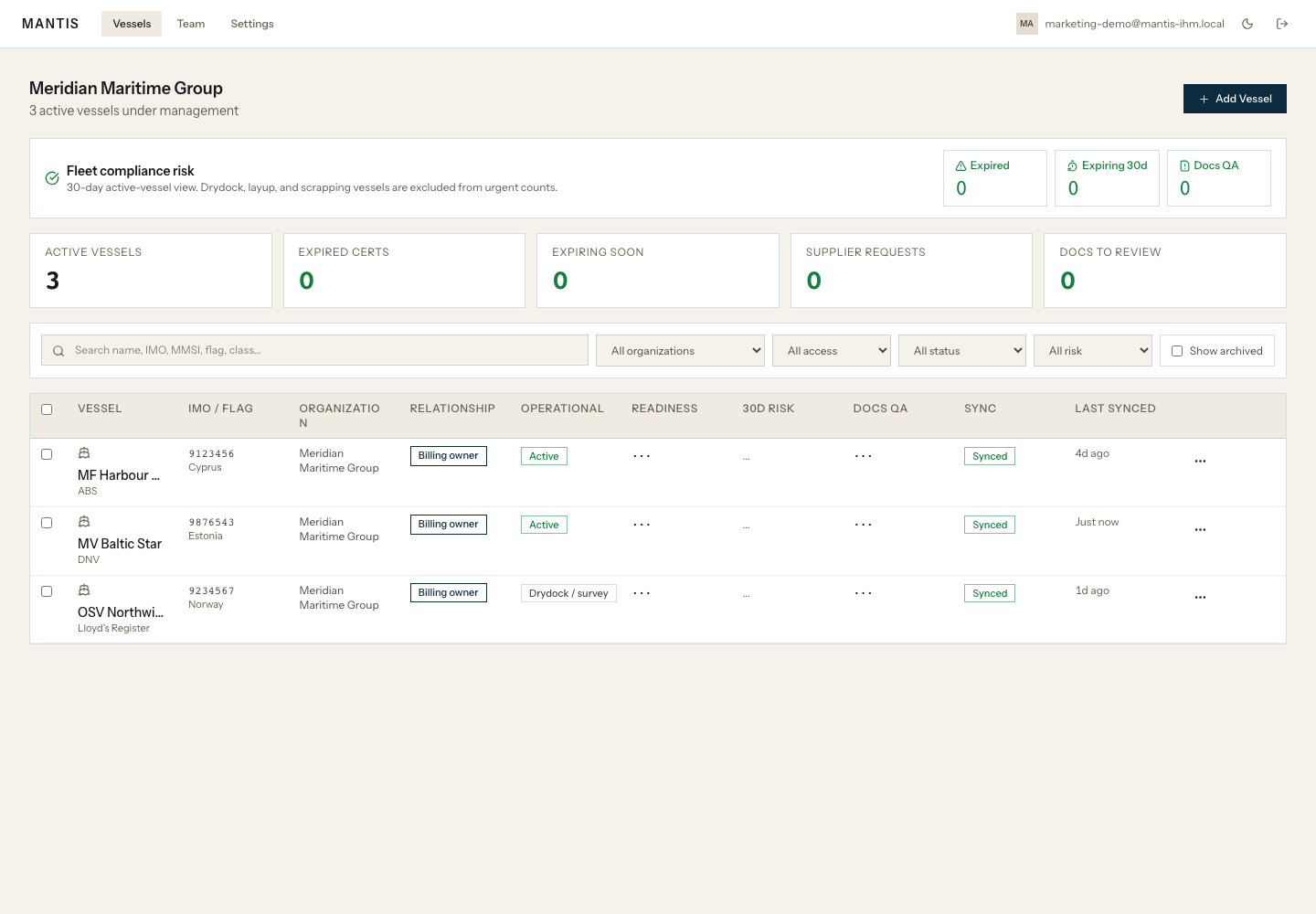
Search by vessel, IMO, flag, class, organisation, access type, operating state, and IHM attention.
Owned vessels and shared vessels can sit in the same dashboard without hiding who controls billing and data rights.
Archive vessel history and request full exports for records, evidence, audit history, indexes, and checksums.
Built for operators
That is why the fleet view is part of the product story, not an add-on. Operators need a short daily answer: which vessels need IHM work now?
Direct answers
It shows which vessels need attention first: missing supplier evidence, expiring documents, stale records, owned or shared access, and archived vessel history.
Yes. MANTIS keeps billing-owner and shared-guest access visibly separate, so commercial ownership does not blur with day-to-day management access.
Yes. Organisation owners can request a full archive for the organisation and billing-owner vessels they control, including structured records, uploaded evidence files, audit history, indexes, and checksums.
Request a demo to review fleet visibility, supplier evidence, and export readiness with real vessel records.